Leads Reassign

Move Stagnant Leads Before They Die

A good lead in the wrong employee's queue is a lost lead. Leads Reassign lets you move enquiries to your closers, with every transfer logged so accountability survives the handover.

Moves with leadHistory
Every transactionLogged
StagnationTrigger
Book a 20-min Demo Ask on WhatsApp
Live product, running today Hinglish-ready Your call audio stays on your Drive
allota.inReal screen · sample data
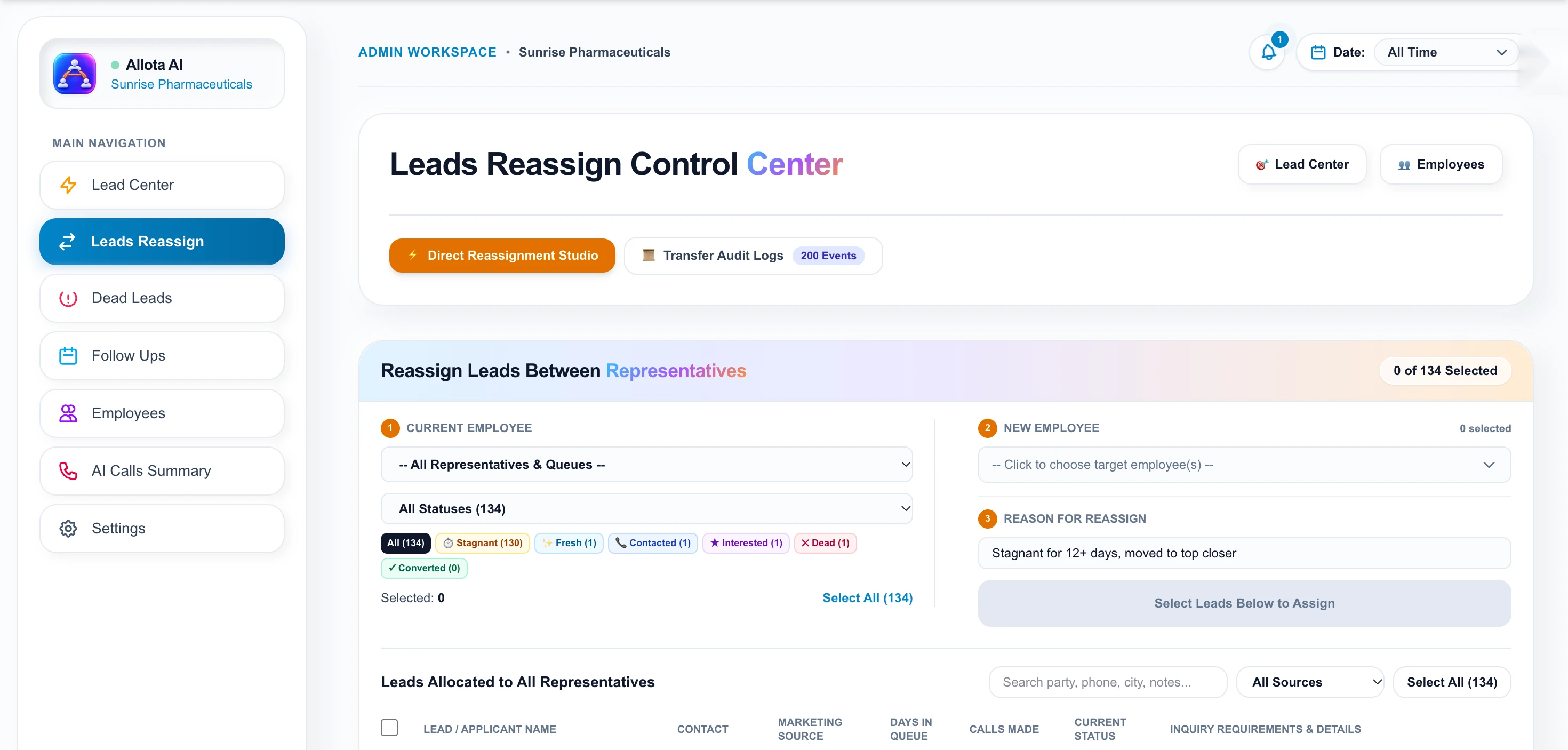
Leads Reassign Control Center
Pick the current employee, the new employee and a reason. Every transfer is logged.
Works with Google Drive· Meta Lead Ads· Instagram· WhatsApp Cloud API· IndiaMART· Marg ERP 9+· Busy· Excel

How does lead reassignment work?

Leads Reassign identifies enquiries sitting idle with a employee and lets you transfer them to another employee in bulk or individually. Every reassignment is recorded as a transaction, so the lead's full history — including who held it before and what was discussed — moves with it rather than being lost.

Bulk or singleTransfer
How it works

Watch Leads Reassign work.

1

Filter the pool

Pick a employee and a status such as Stagnant.

2

Choose the new employee

Select one or several target employees.

3

Add a reason

Recorded alongside the transfer.

4

Logged

Every transfer lands in the audit log.

Who it is for

One module, three people who benefit.

For Sales heads

Move stale leads to your closers in clicks.

For Employees & telecallers

Receive fresh leads when you have capacity.

For Founders & admins

Every transfer is logged for fairness.

See this running on your own numbers

Twenty minutes, screen shared. We open a real call brief and walk the workspace — no slide deck.

The employee who cannot close is still holding your pipeline

Every pharma sales team has the same pattern: two employees close most of the business, the rest hold leads that slowly cool. The leads are not bad — the match is. Without a clean reassignment path, managers either leave them to rot or reassign informally over WhatsApp, losing the history.

Transfers that keep context

When a lead moves, everything moves with it — the call briefs, the classification, the source, the follow-up history. The receiving employee opens a full picture, not a phone number. That is what makes a reassigned lead convertible rather than a cold restart.

Accountability through the log

Each transfer is a logged transaction. Six months later you can see which leads were reassigned, from whom, to whom and what happened next — which tells you as much about your team as it does about the pipeline.

Under3 secfrom finished call to brief
Connects5lead sources, one pipeline
Imports5,000+records per upload
Stores0call audio on our servers

Last updated

Questions

Frequently asked questions

Does the new employee see the previous conversations?
Yes. All call briefs, transcripts, classifications and follow-up history transfer with the lead, so the receiving employee has full context.
Can I reassign many leads at once?
Yes, leads can be moved in bulk or individually, and each transfer is recorded separately in the log.
Is the original employee's work still visible?
Yes. The history is not overwritten — you can always see who held the lead previously and what they discussed.
Get a callback

Want this running for your team?

Tell us your business name and a number. We will call you back, usually the same working day, and show Allota AI on a real call brief.

  • 20-minute demo on your own scenario
  • Hinglish call summaries, lead classification, follow-ups
  • No obligation. Pricing is quoted only if you ask

Ready to see every call your team makes?

Book a 20-minute demo. We'll walk you through a real call brief, the Lead Center and the AI assistant — on your own numbers.

Chat with us

Explore Allota AI